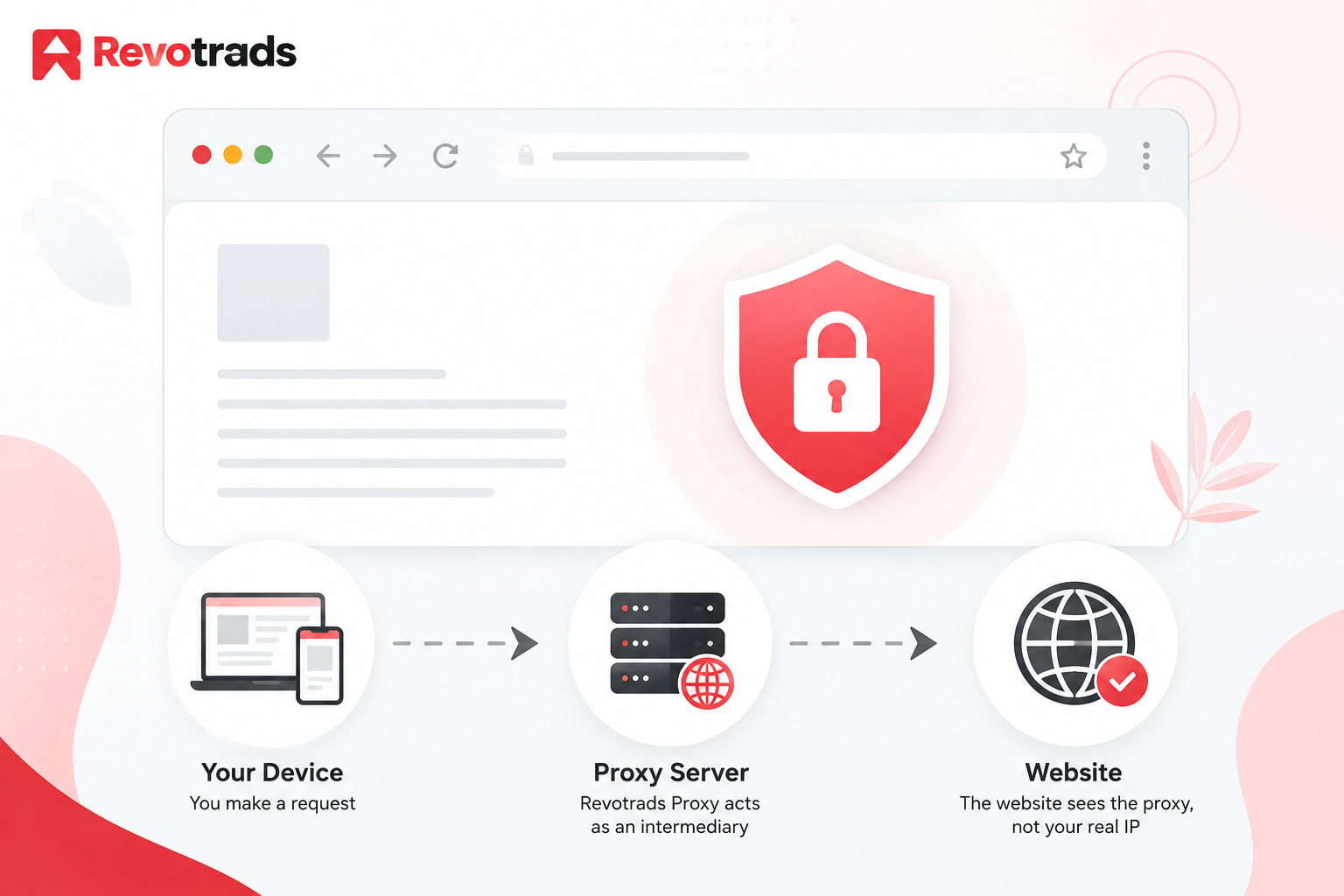
If you’ve ever sat on school Wi-Fi trying to open a site that just won’t load, or connected to airport Wi-Fi and found half the internet blocked, you’ve probably searched for something like “free web proxy”and Proxyium is one of the names that comes up a lot. It’s a browser-based tool that promises quick, no-signup access to websites that might otherwise be unreachable on your current network.
Before you use it, though, it’s worth understanding what it actually does under the hood. A web proxy like Proxyium works as a middleman: instead of your browser talking directly to a website, it sends the request to the proxy first, and the proxy fetches the page on your behalf. That’s genuinely useful for getting around network-level blocks. What it is not is a guarantee of privacy, security, or anonymity and conflating “my IP is hidden from this one website” with “I am now untraceable online” is where a lot of confusion starts.
This guide walks through what Proxyium is, how it compares to a VPN and to Tor, what it can realistically do for you, and just as important, what it can’t. We’ll also look at where free proxies make sense (quick access on a locked-down network) and where they don’t (anything involving your bank, your passwords, or sensitive personal data).
What Is Proxyium?
Proxyium is marketed as a free, browser-based web proxy. In practical terms, it’s a website you visit, where you type in the URL of the page you actually want to see, and it loads that page for you through its own servers rather than a direct connection from your device.
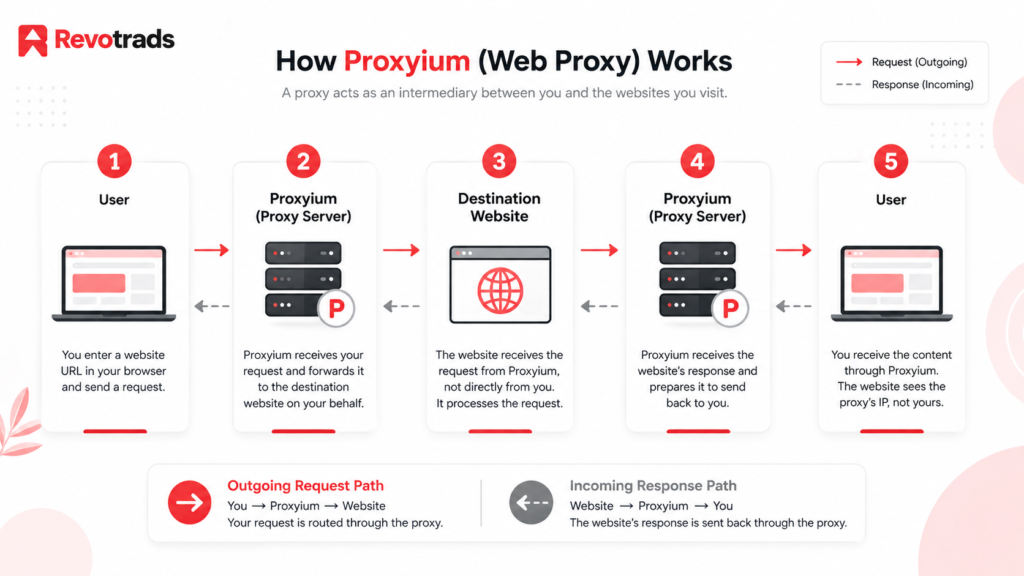
How it works, in plain terms:
- You open Proxyium in any browser, no app or extension to install.
- You paste in the address of the site you want to visit.
- Proxyium’s server fetches that page and displays it back to you inside its own interface.
- The destination website sees a request coming from Proxyium’s server, not from your device’s IP address directly.
Why people use it:
- To get around basic network-level blocks at school, work, or on public Wi-Fi.
- To quickly check how a page looks or behaves, without installing anything.
- As a lightweight, one-off alternative to setting up a full VPN for a single task.
A basic privacy consideration up front: hiding your IP from the destination site is not the same as hiding your activity from everyone, including your own network administrator, your ISP, or Proxyium itself. We’ll unpack exactly why later in this guide.
Simple flow:
User → Proxyium → Destination Website → Proxyium → User
Your browser only ever talks to Proxyium. Proxyium is the one that talks to the destination site and relays the response back to you.
How Does Proxyium Work?
Breaking the process into its individual steps makes it easier to see where the privacy boundaries actually sit.
- You enter a website URL into Proxyium’s search or address bar.
- Proxyium receives that request on its own servers.
- The proxy server connects to the destination website on your behalf, using its own IP address rather than yours.
- The destination website responds to Proxyium, not to you directly as far as that website is concerned, the visitor is Proxyium’s server.
- Proxyium relays the content back to your browser, usually rendered inside its own proxy interface (sometimes with the original site’s URL structure altered).
The practical upshot is that the site you’re visiting typically sees Proxyium’s IP address instead of yours. That can be genuinely useful if a website is blocking traffic from your specific network or region.
But it’s worth being precise about what this masking actually accomplishes. It changes what the destination website can see about your network origin. It does not automatically mean:
- That your traffic is encrypted end-to-end.
- That cookies, scripts, or trackers on the destination site can’t still identify you.
- That your browser’s fingerprint (screen size, fonts, plugins, timezone, etc.) is hidden.
- That your ISP or network administrator can’t see that you’re using a proxy, or infer what you’re doing.
IP masking is one piece of a much bigger privacy picture not the whole picture.
Is Proxyium Really Anonymous?
This is probably the single most important question in this guide, and the honest answer is: not completely, and no free web proxy realistically can be.
To understand why, it helps to separate several concepts that often get lumped together under the umbrella of “anonymous browsing”:
| Concept | What It Actually Covers |
|---|---|
| IP Masking | Hiding your IP adress from the specific website you’re visiting. |
| Privacy | Limiting how much of your activity and identity is collected or exposed in general. |
| Anonymity | Being unidentifiable, a much higher bar than simple privacy. |
| Encryption | Scrambling your data in transit so it can’t be read if intercepted. |
| Browser Fingerprinting | Sites identifying you based on device and browser characteristics, independent of your IP. |
| Cookies | Small files that let sites and advertisers recognize you across visits. |
| Account-Based Tracking | Being logged into Google, Facebook, or similar services can identify you regardless of your IP or proxy. |
| ISP Visibility | What your internet provider can see about your connection when using a proxy or other browsing method. |
A free web proxy like Proxyium mainly affects the first item on that list IP masking, and only for the specific site you’re routing through it. It doesn’t inherently address the rest.
A few concrete examples of why these matters:
- If you’re logged into your Google or Facebook account while browsing through a proxy, that platform still knows exactly who you are the proxy doesn’t log you out or hide your account identity.
- Browser fingerprinting techniques don’t rely on your IP address at all, so a proxy does nothing to stop them.
- Cookies already stored in your browser continue to work through a proxy connection unless you clear them or use a private/incognito window.
- Your ISP can typically still see that your device is connecting to Proxyium’s servers, even if it can’t see the specific pages you view through the proxy.
The bottom line: treat “my IP is hidden from this website” as the accurate description of what a free proxy does not “I am now anonymous online.” Reputable VPN providers, and especially tools like Tor, are built with far more of these layers in mind, though even they come with their own caveats (which we’ll cover shortly).
Proxyium Free Web Proxy: Features
Based on how Proxyium and similar free web proxies are generally described, here’s what to expect. Note that free proxy tools change frequently, and specific claims (like exact server locations or uptime) should be double-checked on the current Proxyium site before you rely on them.
| Feature | What It Means |
|---|---|
| Free Access | No subscription or payment is required to use the basic service. |
| Web-Based Proxy | Runs entirely in your browser — nothing to download or install. |
| IP Masking | The destination website sees the proxy’s IP rather than yours, for that specific session. |
| Browser Compatibility | Generally works across modern browsers such as Chrome, Firefox, Edge, and Safari since it’s accessed as a website. |
| Encryption | Connections to the proxy itself may use HTTPS/SSL, but this is not equivalent to the tunnel-style encryption a VPN provides for all your traffic. |
| Ease of Use | Designed for a simple “paste a URL and go” experience, with no account needed. |
| Multiple Locations | Some free proxies offer a choice of server region; availability and reliability can vary. |
| Privacy Limitations | Doesn’t cover fingerprinting, cookies, or account-based tracking, and typically only proxies browser traffic rather than your whole device. |
If a specific claim about Proxyium (uptime, number of server locations, specific supported sites) matters for your decision, it’s worth checking Proxyium’s own site directly, since free web proxy services can change their infrastructure and offerings without much notice.
How to Use Proxyium
Using a browser-based proxy like this is intentionally simple:
- Open the Proxyium website in your browser, on desktop or mobile.
- Enter the URL of the website you want to visit into the proxy’s address bar.
- Select any available options, such as a server location, if the tool offers that choice.
- Start browsing the destination site loads through Proxyium’s interface.
- Understand what’s still visible. Anything you type into forms, any account you log into, and any cookies already present in your browser can still identify or track you, proxy or not.
A note on scope: this guide focuses on using a proxy for its intended purpose general browsing on networks where certain sites are blocked. It’s not a guide to bypassing authentication systems, paywalls, or access controls you’re not authorized to get around, and using a proxy for that kind of purpose can violate a website’s terms of service or, depending on context, the law.
Proxyium vs VPN
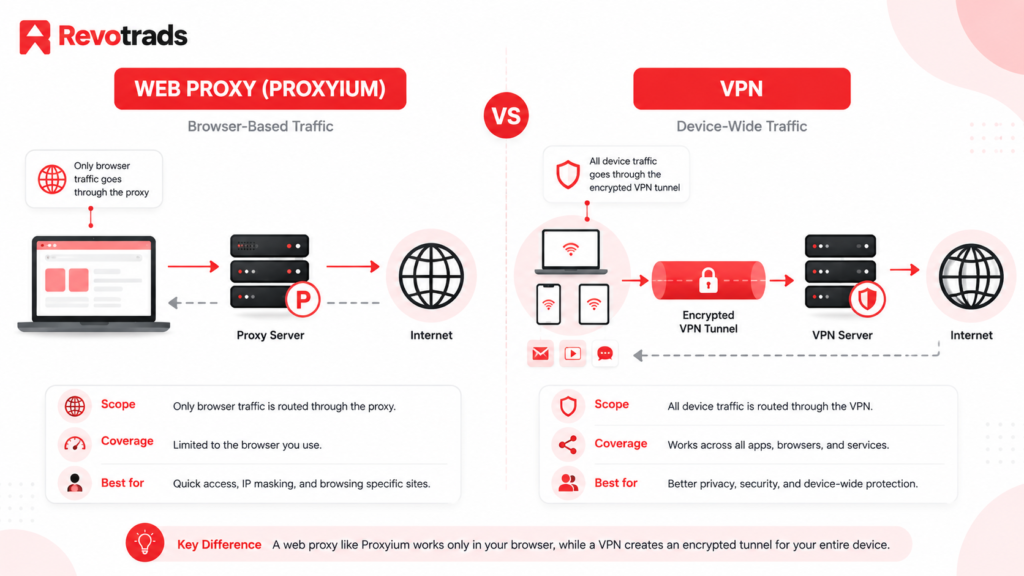
This is usually the comparison people care about most, so it’s worth being specific.
| Feature | Proxyium / Web Proxy | VPN |
|---|---|---|
| IP Address Masking | Yes, for the site being proxied. | Yes, generally across your whole device. |
| Encryption | Limited, typically just the connection to the proxy itself. | Usually provides full-tunnel encryption for all device traffic. |
| Device-Wide Protection | No, only browser traffic sent through the proxy is affected. | Often yes, depending on configuration. |
| Browser-Only Usage | Yes, that’s the primary use case. | No, a VPN typically protects apps, background processes, and system traffic too. |
| Ease of Setup | Very easy, just open a website. | Easy to moderate, usually requires installing an app. |
| Software Required | None. | Yes, in most cases, an app or system configuration is required. |
| Privacy Level | Basic. | Generally higher, but depends heavily on the provider. |
| Performance | Can be slower due to how traffic is rendered through the proxy interface. | Varies by provider and server load, but is generally more consistent. |
| Best Suited For | Quick, occasional access to a blocked site from a browser. | Ongoing, broader privacy and security needs. |
The core distinction: a web proxy generally reroutes the traffic from your browser tab through its own server, while a VPN creates an encrypted tunnel that can cover most or all of your device’s internet traffic, depending on how it’s set up.
One important caveat that’s easy to skip past: not every VPN is automatically private or secure. A VPN shifts your trust from your ISP to the VPN provider, if that provider logs your activity, has weak security practices, or is based somewhere with limited data protection standards, you haven’t necessarily gained much privacy. Choosing a reputable, transparent VPN provider matters as much as the technology itself.
Proxy vs VPN vs Tor
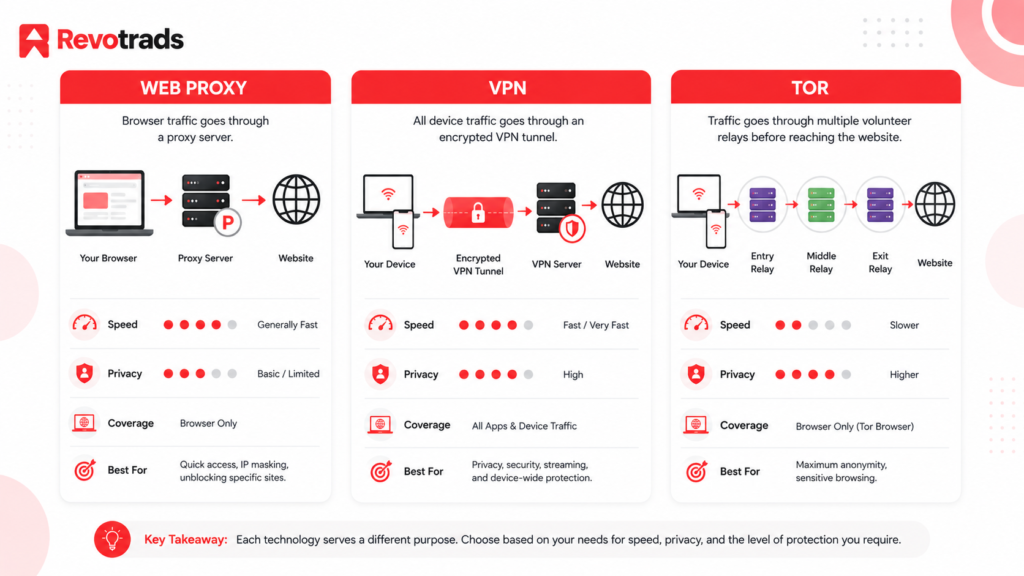
Zooming out a bit further, it helps to see how a basic web proxy fits alongside VPNs and Tor, since people often search for all three when researching “anonymous browsing.”
| Technology | Main Purpose | Privacy Level | Ease of Use | Best For |
|---|---|---|---|---|
| Web Proxy | Browser-based proxying of individual sites. | Basic / limited | Easy | Casual, occasional browsing. |
| VPN | Encrypted connection covering broader device traffic. | Higher (provider-dependent) | Easy to moderate | General day-to-day privacy. |
| Tor | Multi-hop anonymity network routing traffic through several relays. | High anonymity potential | Moderate | Privacy-focused browsing where anonymity is the priority. |
These three tools solve overlapping but different problems. A web proxy is about convenience and getting around a specific block. A VPN is about broader, ongoing privacy and security for your connection. Tor is built specifically around resisting traffic analysis and identification, at the cost of speed and some convenience. None of them is a strict upgrade over the others in every dimension the right tool depends on what you’re actually trying to protect against.
Popular Websites You Can Access Through a Web Proxy
Rather than promising that any specific site will always work, it’s more useful to think in categories, since compatibility can and does change as sites update their security measures.
Generally, web proxies are most commonly used for:
- Search engines: Simple, mostly static content that tends to render well through a proxy.
- News websites: Text-heavy pages are usually proxy-friendly, though some paywalled or JavaScript-heavy sites may not load correctly.
- Social media platforms: Often work for basic browsing, but login, messaging, and media-heavy features can be inconsistent.
- Video websites: Playback can be hit-or-miss depending on how the site streams content and whether it detects proxy traffic.
- Blogs and personal websites: Typically load well, being simpler in structure.
- Public information sites: Government info pages, reference sites, and similar content generally proxy well.
- Educational websites: Course pages and reference material tend to work, though some school portals actively block known proxy IPs.
If a particular site matters to you, it’s worth testing it directly rather than assuming based on category, proxy compatibility depends on how a site is built and how aggressively it detects proxy traffic, both of which change over time.
Can Proxyium Access YouTube, Facebook, Reddit, and Other Popular Sites?
A quick platform-by-platform look, with the understanding that none of this is guaranteed and can shift as these platforms update their systems.
YouTube: Video-heavy sites like YouTube are often more demanding for a proxy to handle well expect variable video quality or occasional loading issues, since streaming relies heavily on JavaScript and adaptive delivery that doesn’t always play nicely with proxy rendering.
Facebook: Basic browsing may work, but Facebook’s login flow, security checks, and anti-automation systems are specifically designed to flag unusual traffic patterns including proxy use which can trigger CAPTCHAs or temporary restrictions.
Reddit: Generally, more proxy-friendly for reading content, though logging in, voting, or posting may run into the same detection systems that other platforms use.
General limitations across most major platforms:
- JavaScript-heavy interfaces don’t always render correctly through a proxy.
- Cookies and session data can behave unpredictably.
- CAPTCHAs are common, since proxy traffic is a known signal platforms watch for.
- Many platforms maintain blocklists of known proxy IP ranges, including popular ones.
- Logging into any account while using a proxy still identifies you to that platform, the proxy doesn’t change that.
Why you shouldn’t rely on a proxy for sensitive account activity: if you’re logging into a real account, email, banking, social media, a proxy doesn’t add meaningful protection to that login, and depending on the proxy’s own security practices, it could theoretically introduce new risk by routing your credentials through a third party’s servers. This is worth taking seriously rather than glossing over.
Proxyium for Public Wi-Fi
Public Wi-Fi, airports, cafés, hotels, college campuses, is one of the more common scenarios where people reach for a free proxy. Its worth being clear about what a proxy does and doesn’t add in this context.
- Airport and café Wi-Fi: Often unencrypted or minimally secured, making it easier for others on the same network to intercept unprotected traffic. A proxy can route around content blocks but doesn’t inherently secure your connection to the same standard as HTTPS or a VPN tunnel.
- Hotel Wi-Fi: Similar concerns, plus hotel networks sometimes inject their own tracking scripts or ads.
- College Wi-Fi: Often has specific sites blocked at the network level (streaming, social media, certain forums) this is the classic use case where a proxy’s IP-masking is genuinely helpful for simply getting a page to load.
- Public hotspots generally: Convenience-focused proxies weren’t built with the same security rigor as dedicated privacy tools, so it’s reasonable to be cautious about what you do while connected through one.
The key point: a web proxy should not be treated as a full replacement for secure HTTPS connections (look for the padlock icon and “https://” in your browser) or a properly configured VPN when you’re on a network you don’t fully trust. It’s a convenience tool for accessing blocked content, not a comprehensive public Wi-Fi security solution.
Is Proxyium Safe?
“Safe” depends heavily on what you’re using it for, so let’s break this down by activity type.
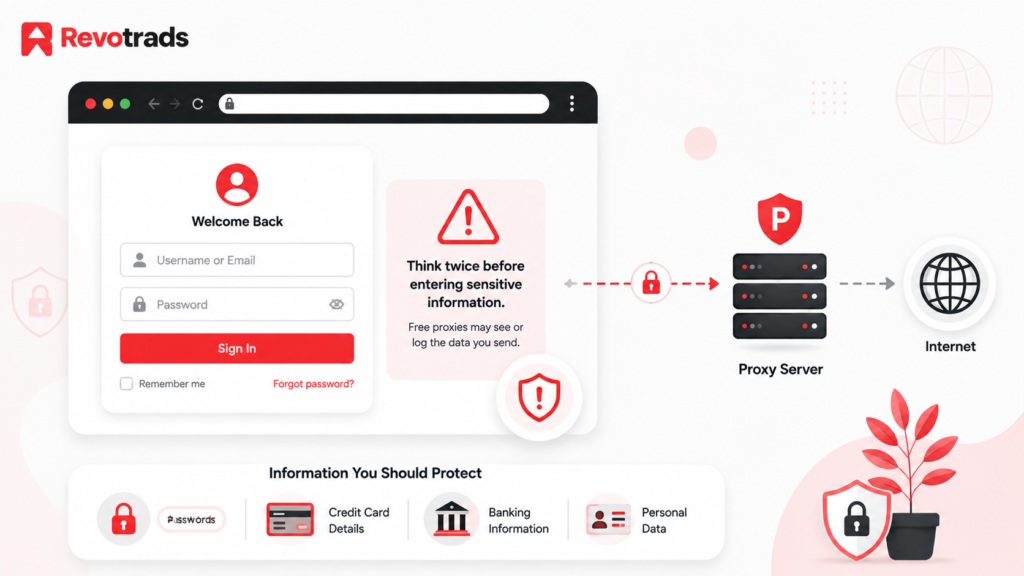
HTTPS still matters. If the destination site uses HTTPS, that connection’s encryption is generally preserved even when routed through a proxy, but you’re still adding a third party (the proxy operator) into the chain who could, in principle, see the traffic passing through their servers.
Sensitive information, be cautious. This includes:
- Passwords and login credentials: Entering these through an unfamiliar free proxy means trusting that proxy’s infrastructure with your credentials.
- Banking and payment information, This is not a reasonable use case for a free web proxy. Financial institutions also often flag or block proxy traffic outright, and the stakes if something goes wrong are simply too high.
- Cookies and session information: Proxies can interact unpredictably with session cookies, sometimes causing you to get logged out, or in rarer cases, causing session data to be mishandled.
- Browser tracking and third-party scripts: These generally still function through a proxy, since they’re independent of your IP address.
Trust in the provider matters. With any free proxy, you’re relying on that provider’s infrastructure and, to some extent, their business model, free services need to generate revenue somehow, whether through ads, data practices, or other means. It’s reasonable to read a proxy’s privacy policy (if one exists) before routing anything sensitive through it.
Strong recommendation: don’t enter banking credentials, payment card details, sensitive passwords, or confidential business information through an unfamiliar or unverified free proxy. Save proxies for the kind of browsing where, if something went sideways, the consequences would be minor, checking a blocked news article, not logging into your bank.
Proxyium Limitations
To keep expectations realistic, here’s a straightforward list of what tends to trip people up:
- Slower browsing: Traffic has to route through an extra server and often gets re-rendered, adding latency.
- Website compatibility problems: Modern, JavaScript-heavy sites don’t always display correctly.
- CAPTCHAs: Frequent on major platforms that actively detect proxy traffic.
- Login restrictions: Some sites block sign-in attempts from known proxy IP ranges entirely.
- JavaScript limitations: Interactive features may break or behave inconsistently.
- Cookie and session problems: You may get logged out unexpectedly or see broken personalization.
- Proxy IP blocking: Popular free proxies are well-known to many websites, which maintain blocklists against them.
- Limited privacy compared with VPNs: As covered earlier, it addresses IP masking for one site, not device-wide traffic or fingerprinting.
- Potential tracking and privacy concerns: Free services need a business model, and it’s worth understanding how they sustain themselves.
- Not device-wide protection: Only the traffic you actively route through the proxy interface is affected; everything else on your device browses normally.
Proxyium vs Free Proxy Websites
Free web proxies are not all built the same way, and the market includes everything from well-maintained tools to poorly secured or actively sketchy sites. Before trusting any of them, Proxyium included, it’s worth evaluating along a few dimensions:
- Privacy policy: Does the service publish one? Is it specific about what data is collected and for how long?
- HTTPS support: Does the proxy itself use HTTPS to protect the connection between you and its servers?
- Transparency: Is it clear who operates the service and how it’s funded?
- Logging practices: Does the provider state whether or how long it retains logs of your activity?
- Advertising: Heavy, intrusive, or suspicious ad placements can be a signal of a lower-trust operation, and some ad networks used by free proxies have weaker vetting standards.
- Speed: Consistent performance is a reasonable proxy (no pun intended) for well-maintained infrastructure.
- Location availability: Does it offer a meaningful choice of server regions, or just a single access point?
- Website compatibility: Does it reliably render the kinds of sites you actually need?
- Reputation: What do independent reviews and user reports say, beyond the service’s own marketing?
Because this space includes a lot of look-alike and copycat proxy sites, it’s worth double-checking that you’re on the legitimate Proxyium domain rather than an imitation before entering any information at all.
Proxyium Alternatives
If Proxyium doesn’t fit your needs, or you want options for different situations, here’s how alternatives generally break down by category.
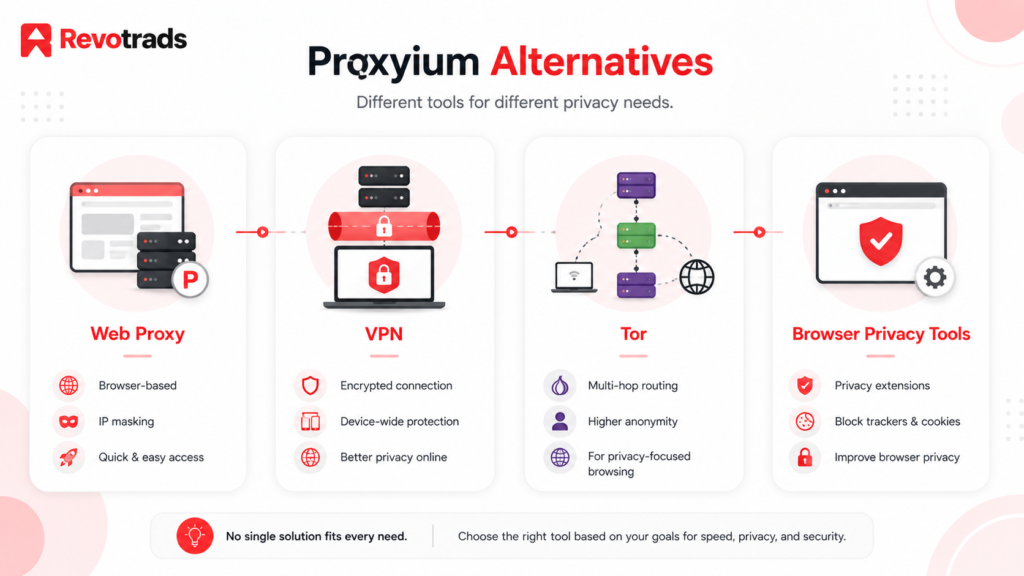
Other Web Proxies: Similar browser-based tools exist with comparable trade-offs: convenient, free, but limited in privacy scope. Evaluate them with the same criteria above (HTTPS, transparency, logging practices).
Reputable VPN Services: For broader, more consistent privacy and security, a paid VPN from an established provider with a clear no-logs policy (ideally independently audited) is generally a stronger choice than any free proxy. Free VPN tiers exist too, but they come with their own trade-offs, often limited data, slower speeds, or, in some poorly-run cases, questionable data practices, since free VPNs also need a business model.
Tor Browser: For the strongest anonymity focus among commonly available tools, Tor routes traffic through multiple independent relays. It’s slower than a VPN or proxy and not ideal for everyday browsing like streaming, but it’s purpose-built for resisting traffic analysis.
Browser Privacy Tools: Beyond proxies and VPNs, tools like tracker-blocking extensions, privacy-focused browsers, and regularly clearing cookies address a different piece of the puzzle: reducing fingerprinting and cross-site tracking rather than IP masking.
If you’re considering a paid VPN, it’s worth reading independent, recent reviews rather than relying solely on the provider’s own claims, since the VPN market includes a wide range of trustworthiness.
Free Proxy vs Paid VPN
A quick decision guide for matching the tool to the actual need:
| If You Need… | Better Option |
|---|---|
| Quick Browser-Based Proxy Access | Web Proxy |
| Occasional IP Masking for a Single Site | Web Proxy |
| Device-Wide Traffic Protection | VPN |
| Better Encryption and Broader Privacy | Reputable VPN |
| Strong Anonymity as the Top Priority | Tor |
| Sensitive Financial Activity | Avoid relying on free proxies, use your bank’s official app or a fully secured, trusted connection. |
Who Should Use Proxyium?
A free web proxy like this fits well for:
- Casual browsing on a network with basic content restrictions.
- Testing how a website behaves from a different IP or region, out of curiosity or for light research.
- Accessing public, non-sensitive information that happens to be blocked on your current network.
- Temporary, one-off browser proxy needs, you don’t want to install a VPN app for a five-minute task.
- Learning about how proxy technology works, as a low-stakes way to understand the concept firsthand.
Who Should NOT Rely on Proxyium?
On the other end, it’s worth being direct about where a free proxy is the wrong tool:
- Online banking: The risk-to-benefit ratio doesn’t make sense here.
- Payment transactions: Same reasoning; use trusted, direct, secured connections.
- Confidential business communication: Sensitive work correspondence shouldn’t route through third-party infrastructure you don’t control.
- Highly sensitive personal accounts: Anything tied to your real identity where a breach would matter.
- Device-wide privacy needs: A proxy only covers what you actively route through it, not your whole device.
- Security-critical activities generally: Anywhere the cost of something going wrong is high, lean toward tools built specifically for security, not convenience.
Frequently Asked Questions
What is Proxyium?
Proxyium is a free, browser-based web proxy that lets you access websites by routing your request through its own servers, without installing any software.
Is Proxyium free?
Yes, the core web proxy service is generally free to use, without requiring a sign-up.
Is Proxyium a VPN?
No. It’s a web proxy, which typically only reroutes browser traffic for the site you’re actively viewing, rather than creating an encrypted tunnel for your whole device the way a VPN does.
Does Proxyium hide my IP address?
It hides your IP address from the specific website you’re visiting through it, since that site sees the proxy’s IP rather than yours.
Is Proxyium completely anonymous?
No. IP masking is only one part of anonymity factors like account logins, cookies, and browser fingerprinting can still identify you, and no free proxy should be treated as providing complete anonymity.
Is Proxyium safe to use?
It’s reasonable for casual, low-stakes browsing. It’s not recommended for sensitive activities like banking or entering confidential information, since you’re routing that data through a third party’s infrastructure.
Can I use Proxyium on my phone?
Since it’s browser-based, it generally works on mobile browsers as well as desktop, though the experience and site compatibility can vary by device.
Can Proxyium access YouTube?
It may work for basic browsing, but video streaming sites are often more demanding for proxies to render correctly, so expect inconsistent results.
Can Proxyium access social media websites?
Basic browsing may work, but login, posting, and other interactive features often run into detection systems that major platforms use to flag proxy traffic.
What is the difference between Proxyium and a VPN?
A web proxy like Proxyium typically covers only browser traffic for the site you’re actively viewing and offers limited encryption; a VPN generally covers more of your device’s traffic with stronger, consistent encryption.
Does Proxyium encrypt my internet connection?
The connection to the proxy itself may use HTTPS, but this isn’t equivalent to the full-tunnel encryption a VPN provides across your device.
Is Proxyium better than Tor?
They serve different purposes. Tor is built specifically for strong anonymity through multi-hop routing, while a web proxy prioritizes speed and convenience for quick, casual access. Tor is generally the stronger choice when anonymity itself is the priority.
Can I use Proxyium for online banking?
No, this isn’t a recommended use case for any free web proxy, given the sensitivity of financial data and credentials involved.
What are the best Proxyium alternatives?
Depending on your needs: other web proxies for similar quick access, a reputable paid VPN for broader privacy, or Tor Browser for stronger anonymity.
Why is Proxyium sometimes slow?
Free proxy services route and often re-render traffic through their own servers, which adds latency, and server load can vary depending on how many people are using the service at once.
Final Verdict
Proxyium, like most free web proxies, is a genuinely useful tool for a specific, narrow job: getting a blocked page to load quickly, without installing anything, when you’re on a restrictive network. For that use case, it does what it’s designed to do.
Where it falls short is anywhere people mistake “my IP is hidden from this website” for “I’m anonymous and secure online.” Those are very different claims. A free proxy doesn’t address browser fingerprinting, doesn’t stop account-based tracking, doesn’t encrypt your whole device’s traffic, and shouldn’t be trusted with sensitive information like banking credentials or confidential communications.
If your needs go beyond occasional, casual browsing, if you want consistent privacy across your whole device, tronger encryption, or serious anonymity, a reputable VPN or, for anonymity specifically, Tor Browser, are better-suited tools. None of these technologies is universally “the best” they’re built to solve different problems, and picking the right one starts with being honest about what you actually need.
For more on related topics, see our guides on how VPNs actually work and browser security fundamentals on Revotrads.