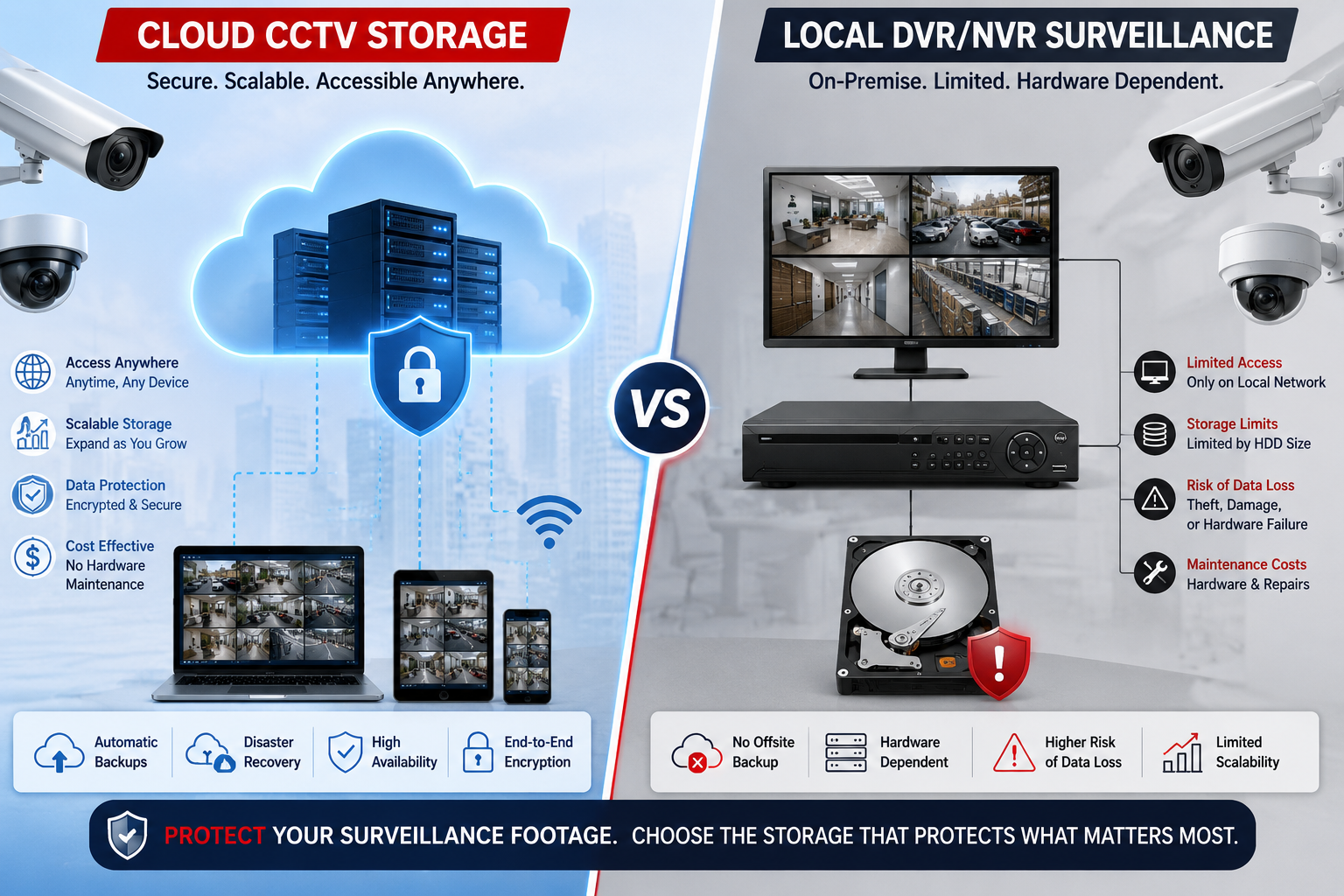
Buying and installing security cameras is the easy part. The harder question, the one most people only think about after an incident happens is what occurs to the footage once it’s recorded. Where does it live? How long is it kept? Can you get to it if your office is on fire or your hard drive dies? This is where the real decision lies: Cloud CCTV vs Local Storage.
Both approaches record the same video, but they store, protect, and deliver it in very different ways. Cloud CCTV storage pushes your footage off-site to remote servers over the internet, while local storage keeps everything on physical hardware inside your building a DVR, an NVR, or a network-attached storage (NAS) box sitting in a back room or server closet.
Neither is universally “better.” A home user in a small apartment in Pune has very different needs than a 40-branch retail chain across Delhi NCR. This guide walks through both options in detail, cost, security, reliability, scalability, and real-world use cases, so you can figure out which one (or which combination) actually fits your situation.
What Is Cloud CCTV Storage?
Cloud CCTV storage means your cameras send recorded video over the internet to remote servers operated by a cloud hosting provider, instead of (or in addition to) saving it on a device in your building. The provider manages the storage infrastructure, backups, and security, and you access your footage through a mobile app or web dashboard from anywhere with an internet connection.
Here’s a simple example: a shopkeeper installs a cloud-enabled camera above the billing counter. The camera captures video, compresses it, and uploads it to the provider’s servers over Wi-Fi or a wired connection. That night, if there’s a dispute about a transaction, the owner opens an app on their phone, even from home and scrubs through the footage without ever touching a physical device.
Typical use cases include small retail stores that want remote access without hiring IT staff, multi-location businesses that need to view several sites from one dashboard, and homeowners who want alerts and playback on their phone while traveling.
What Is Local CCTV Storage?
Local storage keeps footage on hardware physically located on your premises. The three common forms are:
- DVR (Digital Video Recorder): Used mostly with older analog cameras; footage is written directly to an internal hard drive.
- NVR (Network Video Recorder): Used with IP cameras; video is streamed over the local network and stored on the NVR’s drive.
- NAS (Network-Attached Storage): A separate storage box on the network that can pool footage from multiple NVRs or servers, often used in larger setups.
In each case, footage stays inside a drive on-site. Playback typically happens through a monitor connected to the DVR/NVR, or through local network access if remote viewing has been configured separately. This is common in warehouses, factories, and offices where IT teams prefer to keep full physical control over the recordings and don’t want them leaving the building.
How Does Cloud CCTV Storage Work?
The basic flow looks like this:
Camera → Internet → Cloud Platform → Secure Storage → User Dashboard/App
- Recording and upload: The camera captures video and streams or uploads it to the cloud provider’s servers, either continuously or triggered by motion.
- Encryption: Reputable providers encrypt footage both in transit and at rest, so intercepted data isn’t usable without the decryption key.
- Storage and retention: Footage is stored according to a retention period you choose or that’s included in your plan, commonly 7, 30, or 90 days, though this varies by provider and pricing tier.
- Backup: Cloud platforms generally replicate data across multiple servers or data centers, reducing the risk of losing footage to a single hardware failure.
- Authentication and access: Users log in through an app or browser, often with two-factor authentication, and can view live or recorded footage remotely.
How Does Local CCTV Storage Work?
The flow here is:
Camera → DVR/NVR → Local Hard Drive → Monitor/Network Access
Cameras send a continuous or motion-triggered video feed to the DVR or NVR, which writes it to an internal hard drive. Once the drive fills up, most systems overwrite the oldest footage automatically, so your effective retention period depends entirely on drive capacity, camera resolution, and how many cameras are recording. Retrieval usually means connecting a monitor directly to the device, or logging into it over the local network (and, if configured, over the internet through port forwarding or a manufacturer’s remote-access app). Backing up footage typically requires manually exporting clips to a USB drive or another storage device, unless additional backup software or a secondary NAS has been set up.
Cloud CCTV vs Local Storage: Key Differences
| Factor | Cloud CCTV Storage | Local CCTV Storage |
|---|---|---|
| Initial cost | Generally lower (fewer hardware needs) | Generally higher (DVR/NVR + drives) |
| Recurring cost | Subscription/storage fees | Usually none, aside from maintenance |
| Storage capacity | Scales with subscription plan | Limited by physical drive size |
| Scalability | Easier — adjust plan as cameras grow | Requires added hardware |
| Remote access | Built in by default | Possible, but needs extra setup |
| Internet dependency | High — needed for upload/playback | Low for recording; needed for remote viewing |
| Data security | Provider-managed encryption and access control | Depends on local network security setup |
| Physical security | Footage isn’t on-site, reducing theft risk | Vulnerable if hardware is stolen/damaged |
| Maintenance | Handled by provider | User/IT team responsible |
| Backup | Usually automatic and redundant | Often manual unless configured |
| Reliability | Depends on internet and provider uptime | Depends on power, network, and hardware health |
| Storage retention | Defined by plan | Defined by drive capacity |
| Disaster recovery | Strong (off-site copies) | Weak unless separately backed up |
| Hardware requirements | Minimal | DVR/NVR, drives, cabling |
| Multi-location support | Centralized dashboard | Requires separate access per site |
| Ease of management | Simple, app-based | More technical, hands-on |
The biggest differences that tend to matter most in practice are disaster recovery, ongoing cost, and how much technical effort you’re willing to put in. A fire, flood, or theft that destroys your local DVR also destroys your only copy of the footage cloud storage largely avoids that problem by keeping a copy off-site.
Cost Comparison
Local CCTV storage is largely a CAPEX (capital expenditure) model:
You pay upfront for a DVR/NVR, surveillance-grade hard drives, cabling, and installation, then mostly maintain what you already own. Costs after that are occasional replacing a failed drive, upgrading storage as footage needs grow, or paying for electricity to keep the system running.
Cloud CCTV storage leans toward OPEX (operating expenditure):
Lower upfront hardware costs, but a recurring subscription fee tied to the number of cameras, video resolution, retention period, and any extra features like AI-based alerts. Over several years, a cloud subscription can end up costing more than a one-time hardware purchase but it also spreads cost out and includes maintenance, backup, and support that you’d otherwise have to manage yourself.
For home users, the low upfront cost and simplicity of cloud hosting plans is often appealing, especially for just a couple of cameras. For small businesses, the choice often comes down to whether remote access and reduced IT overhead is worth the subscription fee. Medium businesses with many cameras across one site may find local or hybrid storage more cost-effective once camera counts get high. Large enterprises often use hybrid or cloud-managed local systems, since both scalability and centralized control matter at that size. Exact pricing varies significantly by provider, resolution, and region, so it’s worth requesting quotes rather than assuming a fixed number.
Security: Cloud CCTV vs Local Storage
Security isn’t inherently better on one side it depends heavily on how the system is set up. Cloud providers generally offer strong encryption in transit and at rest, multi-factor authentication, and granular access control, but you’re trusting a third party with your footage and depending on their security practices holding up against breaches. Local systems keep footage physically in your control, which some organizations prefer, but they’re only as secure as the network they sit on a poorly configured NVR exposed to the internet can be a serious vulnerability, and physical theft of the device means losing the footage entirely (and potentially handing it to whoever stole it).
Ransomware is a growing risk for local systems connected to a broader network, since attackers who compromise a network can sometimes reach and encrypt local storage. Cloud systems aren’t immune to unauthorized access either, particularly if account credentials are weak or shared carelessly. In both cases, backups whether cloud-based redundancy or a second local/off-site copy are what actually protect you from losing footage permanently.
Reliability and Downtime
Cloud CCTV depends on a stable internet connection; if your connection drops, live viewing and uploads can be interrupted, though many cloud cameras include a small local buffer to record temporarily and sync later. It also depends on the provider’s own infrastructure staying online, though established providers typically offer high uptime through redundancy across servers.
Local CCTV depends on your local network, a stable power supply, and the physical health of the DVR/NVR and hard drive, mechanical drives can fail, especially after continuous recording over years. A UPS (uninterruptible power supply) can protect against brief power cuts, and RAID-configured NAS setups add redundancy against a single drive failure. For internet reliability on the cloud side, a backup internet connection (like a secondary SIM-based router) can reduce downtime risk.
Remote Access and Monitoring
This is one area where cloud CCTV has a clear practical edge. Because footage already lives on internet-accessible servers, viewing it from a phone or laptop anywhere is usually built into the product from day one useful for security teams, multi-location business owners, or anyone who wants to check in without being on-site.
Local systems can also support remote access, through manufacturer apps or port forwarding, but it typically requires more setup and carries additional network security considerations if not configured carefully.
Scalability
Expansion is where the gap between the two approaches becomes obvious. Going from 4 cameras to 16 usually just means adding more channels to your cloud hosting plan, no new hardware needed on the storage side. Local systems, though, may hit the NVR’s channel limit or the drive’s capacity well before that, requiring a hardware upgrade.
At 50 or 100+ cameras, common in large warehouses, malls, or campuses local systems often need multiple NVRs, additional NAS capacity, and more networking infrastructure, while cloud platforms can generally scale by adjusting the subscription, assuming your internet bandwidth can keep up with the additional upload traffic.
Privacy and Data Ownership
With cloud storage, it’s worth knowing exactly where your footage is stored, who at the provider can access it, how long they retain it, and what happens to it if you cancel your subscription. Look into the provider’s privacy policy, data center locations, encryption practices, and any compliance certifications relevant to your industry (healthcare and education, in particular, often have stricter data-handling expectations). With local storage, ownership and access control are entirely in your hands, but that also means the responsibility for securing that data properly falls entirely on you.
Cloud CCTV vs Local Storage for Different Use Cases
- Home CCTV: Cloud storage is often a good fit, low setup effort, remote viewing, and minimal maintenance for a small number of cameras.
- Small retail store: Cloud storage again tends to work well, especially for owners who want to check in remotely without hiring IT support.
- Office: Either works, depending on whether IT staff are available to manage local hardware and whether remote access across departments matters.
- Warehouse: Local or hybrid storage is common, since large camera counts and high-resolution footage can make cloud bandwidth and subscription costs add up quickly.
- School: Local or hybrid storage is often preferred, partly due to data sensitivity around minors and a preference for on-site control.
- Hospital/healthcare facility: Hybrid setups are common, balancing local control for sensitive footage with cloud backup for disaster recovery.
- Multi-branch business: Cloud storage is usually favored for centralized, single-dashboard monitoring across locations.
- Large enterprise: Hybrid or cloud-managed local systems tend to dominate, combining scalability with the control larger organizations often require.
Hybrid CCTV Storage: Is It the Best of Both Worlds?
Hybrid storage records footage locally first, for fast, internet-independent playback, and also backs it up to the cloud for disaster recovery and remote access. The flow looks like:
Camera → Local Storage + Cloud Backup.
This setup offers quick local access to recent footage, an off-site copy in case hardware is stolen or damaged, and generally lower cloud storage costs than uploading every camera’s full continuous feed, since only key clips or lower-resolution backups may need to go to the cloud. Hybrid storage tends to make sense for organizations that want the reliability of local recording but don’t want to lose everything in a worst-case scenario like fire, flood, or theft.
How to Choose Between Cloud CCTV and Local Storage
Before deciding, it helps to work through a practical checklist:
- How many cameras do you need, and at what resolution?
- What retention period do you require days, weeks, or months?
- How reliable and fast is your internet connection?
- What’s your budget, both upfront and ongoing?
- How sensitive is the footage, and what security level do you need?
- Do you need remote access, and from how many devices or users?
- Are you managing one location or several?
- Are there compliance requirements specific to your industry?
- Do you have IT expertise available to manage local hardware?
- How important is automatic backup and disaster recovery?
- How much will your camera count likely grow in the next few years?
Questions to Ask Before Choosing a CCTV Storage Provider
- Where is the data physically stored?
- How is footage encrypted, both in transit and at rest?
- What is the exact retention period included in the plan?
- Is automatic backup included, or is it an add-on?
- What happens to recording if the internet connection fails?
- Can footage be exported easily for legal or investigative purposes?
- Is there a reliable mobile app for remote viewing?
- How many user accounts and permission levels are supported?
- What happens to stored footage if the subscription is cancelled?
- Is technical support available, and through what channels?
- What is the provider’s disaster recovery strategy?
- Are there hidden bandwidth or storage overage charges?
Pros and Cons
Cloud CCTV Storage
Pros:
- Remote access from anywhere
- Easier scalability as the number of cameras grows
- Automated and redundant backups
- Reduced need for local hardware
- Centralized management across multiple locations
Cons:
- Recurring subscription costs
- Dependent on a stable internet connection
- Ongoing bandwidth is required for video uploads
- Reliance on the provider’s infrastructure and policies
- Data privacy considerations for off-site storage
Local CCTV Storage
Pros:
- One-time hardware investment
- Full local control over recorded footage
- No mandatory recurring subscription fees
- Fast local video playback
- Continues recording even without an internet connection
Cons:
- Hardware maintenance falls on you
- Storage is limited by physical drive capacity
- Risk of hardware failure or wear over time
- Vulnerable to physical theft or damage
- Remote access setup is more technical
- Scaling up usually requires new hardware
Cloud CCTV vs Local Storage: Which One Is Better?
There’s no single right answer here, and be wary of anyone who claims otherwise. Cloud CCTV tends to be the stronger choice when remote access, easy scalability, automated backup, and managing multiple locations from one dashboard are priorities, it trades a recurring cost for convenience and reduced maintenance.
Local storage tends to be the stronger choice when organizations want direct control over their data, predictable one-time costs, the ability to keep recording during internet outages, and don’t want to depend on a third-party provider long-term.
Hybrid storage is often the practical middle ground, giving you fast local access and offline recording, along with an off-site backup for peace of mind if hardware is damaged, lost, or stolen. Many organizations that start with a pure local or pure cloud setup eventually move toward some form of hybrid approach as their needs grow.
FAQs
1. Is cloud storage better than local CCTV storage? Not universally, it depends on your priorities. Cloud storage offers easier remote access and backup, while local storage offers direct control and avoids recurring fees. The “better” option depends on your specific budget, connectivity, and security needs.
2. Can CCTV cameras record directly to the cloud?
Yes, many modern IP cameras can upload footage directly to cloud storage without needing a separate DVR or NVR, provided they have a stable internet connection.
3. Does cloud CCTV require the internet?
Yes, for uploading footage and for remote viewing. Some cloud cameras include a small local storage buffer (like an SD card) to keep recording briefly during an internet outage and sync once the connection returns.
4. Is cloud CCTV secure?
It can be, provided the provider uses strong encryption, secure authentication, and reliable infrastructure. Security also depends on your own practices, like using strong passwords and enabling two-factor authentication.
5. How long can CCTV footage be stored in the cloud? This depends entirely on the provider and plan you choose, common retention periods range from about 7 to 90 days, though some providers offer extended or custom retention for an additional cost.
6. What happens to CCTV footage if the internet goes down?
For pure cloud systems, new footage may not upload until the connection is restored, though many cameras buffer recent footage locally in the meantime. Local and hybrid systems continue recording normally since they don’t depend on internet access for the recording itself.
7. Is local CCTV storage cheaper than cloud storage?
It depends on the time frame. Local storage usually has a higher upfront cost but little to no recurring fee, while cloud storage has lower upfront costs but ongoing subscription charges, so the cheaper option over time depends on how long you use the system.
8. Can I use both cloud and local CCTV storage?
Yes, this is called hybrid storage, and it’s a common approach for organizations that want fast local access along with off-site backup for disaster recovery.
9. Which is better for businesses in India?
It varies by business type and location. Businesses in areas with reliable, affordable internet often find cloud or hybrid storage convenient, while those in areas with less consistent connectivity may lean toward local storage with periodic manual backups.
10. How much cloud storage does CCTV footage require?
This depends on camera resolution, frame rate, compression, and how many cameras are recording continuously versus only on motion detection. Higher-resolution, continuous recording from multiple cameras will require significantly more storage than motion-triggered, lower-resolution setups.
Conclusion
Cloud CCTV and local storage solve the same core problem keeping your footage safe and accessible in fundamentally different ways. Cloud storage offers convenience, remote access, and automated backup, but comes with recurring costs and a dependency on internet connectivity and a third-party provider. Local storage offers control, a predictable one-time cost, and independence from the internet for recording, but places the burden of maintenance, backup, and physical security on you.
There is no universal solution. The right choice comes down to your specific storage requirements, budget, internet reliability, security needs, number of cameras, required retention period, and how important remote access is to your day-to-day operations. For many homeowners and small businesses, cloud storage’s simplicity is worth the subscription. For warehouses, schools, and larger operations with many cameras, local or hybrid storage often makes more practical and financial sense. Whichever direction you lean, take the time to map out your actual requirements first, the right CCTV storage system is the one built around how you’ll actually use it, not just what sounds more modern.