The Ultimate Guide to Cost-Optimizing Your Azure OpenAI Service Deployments
In the burgeoning world of artificial intelligence, Azure OpenAI Service stands out, offering access to powerful models like GPT-4 and GPT-3.5 Turbo. These tools empower developers, startups, and enterprises to build intelligent applications ranging from advanced chatbots to sophisticated content generation systems. However, as AI adoption scales, managing the associated costs becomes a critical challenge for sustainable innovation. For freelancers, developers, IT professionals, founders, creators, agencies, and small businesses, uncontrolled AI spending can quickly erode project profitability and hinder future growth.
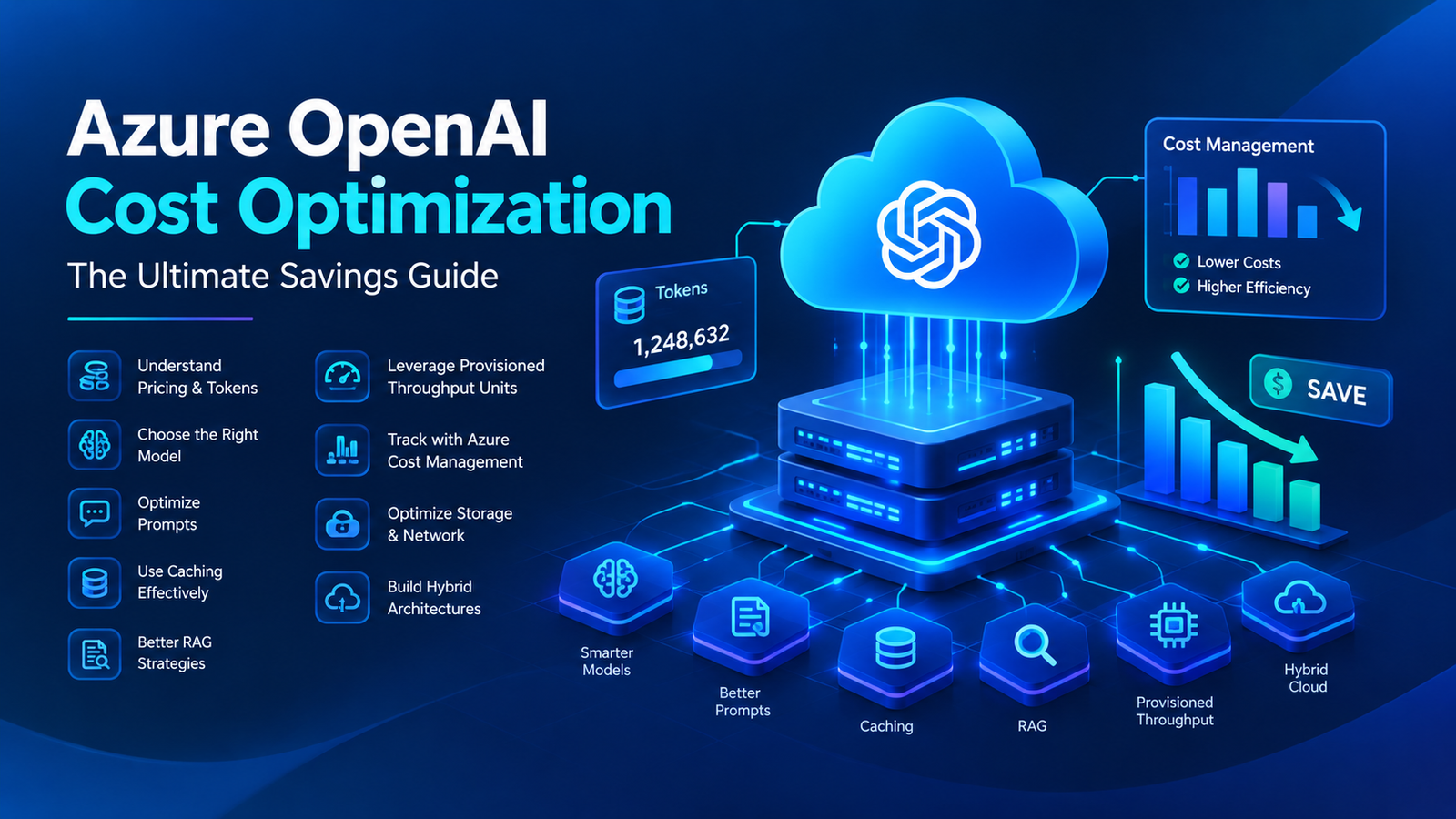
This comprehensive guide will equip you with the practical strategies and architectural insights needed to effectively manage and significantly reduce the operational expenditures of your Azure OpenAI Service deployments. We’ll delve into understanding the underlying pricing mechanisms, implementing smart prompt engineering, optimizing resource provisioning, and leveraging Azure’s built-in cost management tools. Our aim is to help you transform your AI initiatives into lean, efficient, and financially sustainable powerhouses, ensuring maximum return on your valuable AI investments without compromising performance or innovation.
Understanding Azure OpenAI Service Pricing Fundamentals
Effective cost optimization begins with a clear understanding of how Azure OpenAI Service bills for its resources. Unlike traditional infrastructure, AI models utilize unique consumption-based pricing models.
Token-Based Billing Explained
For most generative models (GPT-3.5 Turbo, GPT-4) and embeddings models, billing is based on ‘tokens’. A token is a segment of text, roughly 4 characters in English. You’re charged for both input (your prompt) and output (the model’s response). Different models and tiers have varying costs per 1,000 tokens. Every character directly impacts your bill, making token efficiency paramount. For example, a lengthy prompt to GPT-4 generates more tokens and costs more than a concise query to GPT-3.5 Turbo.
Model Tiers and Their Cost Implications
The choice of model significantly impacts cost. Always select the least expensive model that meets your performance criteria.
- GPT-4: Most capable but also the most expensive. Reserve for complex tasks requiring advanced reasoning and creativity where simpler models fail.
- GPT-3.5 Turbo: Highly capable and significantly more cost-effective. Ideal for a broad range of tasks like content generation, summarization, and conversational AI, balancing performance and affordability.
- Embeddings Models (e.g., text-embedding-ada-002): Cheaper per token, used to convert text into numerical vectors for search and RAG. Costs accumulate with large data volumes.
Using GPT-4 when GPT-3.5 Turbo suffices is a direct route to unnecessary expenditure.
Understanding Provisioned Throughput Units (PTUs)
For high-volume, consistent workloads, PTUs allow you to provision dedicated model capacity, paying an hourly rate regardless of specific token usage within that capacity. This can be cost-effective at scale, offering a lower effective cost per token. However, if usage falls below provisioned capacity, you still pay the fixed hourly rate, requiring careful capacity planning. For sporadic usage, consumption-based billing is generally more economical.
Ancillary Data and Network Costs
Beyond tokens and PTUs, consider data transfer (egress from Azure, especially cross-region or to public internet) and storage costs (for datasets used in fine-tuning, embeddings, or RAG in services like Azure Blob Storage or Cosmos DB). While often smaller, these can add up in large-scale deployments.
Strategic Planning for Cost Efficiency
Cost optimization begins well before deployment, with strategic planning and a clear understanding of your project’s requirements.
Define Use Case and Performance Needs
Clearly articulate your AI application’s purpose, required accuracy, speed, and sophistication. This prevents over-engineering and selecting overly powerful (and expensive) models or architectures. For example, simple review summarization might need GPT-3.5 Turbo, while legal document analysis might require GPT-4 with RAG.
Iterative Model Selection
Always start with the most cost-effective model and scale up only if performance is inadequate. Conduct A/B tests to determine if a cheaper model, possibly with refined prompt engineering, can meet requirements. A tiered approach, using cheaper models for drafts and escalating to more powerful ones for critical tasks, can yield significant savings.
Estimate and Monitor Usage
Estimate anticipated requests per second (RPS), average input/output token lengths, and peak usage patterns. Once live, continuously monitor these metrics using Azure Monitor and Azure Cost Management. Look for trends and unexpected spikes to inform adjustments to your strategy.
Leverage Azure Cost Management Tools
Azure provides robust tools:
- Cost Analysis: Visualize spending, filter by resource type, group, or tags.
- Budgets & Alerts: Set spending limits and receive notifications when thresholds are approached or exceeded.
- Resource Tags: Use tags (e.g., ‘project’, ‘environment’) for accurate cost attribution and accountability.
Regularly reviewing these reports is essential for proactive cost control.
Practical Techniques for Reducing Token Consumption
Token costs are often the largest expenditure. Mastering token efficiency is key to significant savings without compromising quality.
Prompt Engineering Best Practices
Crafting concise and effective prompts is crucial:
- Be Concise: Eliminate unnecessary words and filler. Every word is a token.
- Specify
max_tokens: Always set a reasonable maximum response length to prevent verbose outputs. - System Messages: Use system messages for persistent context, reducing redundant instructions in user messages.
- Few-Shot Learning: Use examples sparingly; only add if strictly necessary for accuracy, as they increase input tokens.
Input Truncation and Summarization
Pre-process your input to send only essential information:
- Content Filtering: Remove boilerplate text, ads, or HTML tags.
- Pre-summarization: For long documents, use a simpler method or a cheaper AI model (e.g., GPT-3.5 Turbo) to summarize before sending to a more expensive model.
- RAG Optimization: In RAG systems, ensure efficient chunking and use vector search to retrieve only the most relevant context, minimizing tokens sent to the generative model.
- Early Exit Logic: Handle simple queries within your application without involving the LLM.
Caching Frequently Used Responses
For repetitive queries with consistent answers, implement a caching layer. Store LLM responses in a fast database (e.g., Azure Cache for Redis) and serve cached results for identical requests, completely bypassing API calls and saving tokens and latency. Ensure appropriate cache invalidation strategies for dynamic content.
Batching Requests
While models process requests concurrently, batching multiple small, independent tasks into a single API call (if context window and task similarity allow) can sometimes be more efficient, particularly for embeddings. More commonly, parallelize independent requests within your application for higher throughput.
Optimizing Provisioned Throughput Units (PTUs)
PTUs are ideal for consistent, high-volume workloads but require careful management to avoid overspending.
When to Use PTUs
Consider PTUs for predictable, high-volume scenarios like customer service chatbots or large-scale content generation pipelines where consistent latency is critical. For sporadic or low-volume usage, pay-as-you-go is generally more cost-effective as you avoid paying for idle capacity.
Sizing and Monitoring PTUs
Accurately sizing PTU deployment prevents over-provisioning (paying for unused capacity) and under-provisioning (throttling). Conduct load testing to determine your application’s peak tokens per second (TPS) requirements. Monitor PTU utilization (TPS consumed, throttling events) via Azure Monitor. Set alerts for high utilization (e.g., 80-90%) to prevent throttling and for low utilization (e.g., consistently below 30%) to identify opportunities for scaling down.
Dynamic PTU Management
You can scale PTUs up or down based on predictable demand cycles (e.g., lower usage at night/weekends). Automate these adjustments using Azure Functions or Logic Apps with Azure CLI/REST API calls. Be mindful of provisioning times and plan changes carefully to avoid service interruptions.
Managing Data and Network Costs
While often secondary, data transfer and storage costs can become significant in data-intensive AI applications.
Efficient Data Storage
Choose appropriate Azure storage solutions and tiers:
- Azure Blob Storage: For unstructured data (documents, large text files). Use Hot, Cool, or Archive tiers based on access frequency.
- Azure Cosmos DB: For vector embeddings, conversational history, or structured metadata. Optimize throughput (RU/s) and use Time-to-Live (TTL) to expire old data.
Always consider data compression to reduce storage footprint and transfer volumes.
Minimize Cross-Region Data Transfers
Data egress charges apply when data leaves an Azure region. Co-locate your Azure OpenAI Service deployments with your calling application in the same Azure region to minimize costly inter-region data transfers. For multi-region deployments, place AI instances closest to major user bases or data sources.
Azure Private Endpoints
While primarily for security, Azure Private Endpoints can reduce public internet egress costs by keeping traffic within the Azure backbone network. They incur a small hourly cost and add complexity, so assess their value based on your specific security and traffic patterns.
Architectural Considerations for Long-Term Savings
Strategic architectural choices can lead to substantial, sustained cost savings.
Effective Retrieval Augmented Generation (RAG)
RAG systems enhance LLM accuracy and reduce hallucinations, also saving costs:
- Optimized Chunking: Break documents into appropriate, semantically relevant chunks.
- Advanced Retrieval: Use hybrid search and re-ranking to ensure only the most concise and relevant context is passed to the LLM, reducing input tokens.
- Caching Embeddings: Generate embeddings (e.g., with
text-embedding-ada-002) once for static documents and cache them, avoiding redundant API calls. - Model Specialization: Use cheaper embedding models for retrieval and more powerful generative models for synthesis.
Hybrid Architectures
Consider combining local and cloud processing:
- Edge AI: Perform pre-processing or simpler AI tasks locally, sending only complex requests to Azure OpenAI, minimizing API calls and data transfer.
- Open-Source Alternatives: For non-critical tasks, deploy smaller open-source LLMs on Azure cloud Virtual Machine’s or AKS, shifting from token-based to compute-based costs. This requires managing infrastructure but can be cheaper at scale for specific use cases.
Microservices for Granular Control
Decompose your application into microservices, each leveraging the most cost-effective Azure OpenAI model or even a different AI service. This allows for isolated scaling and granular cost control, preventing an expensive model from being used for trivial tasks across the entire application.
Common Cost Overruns and How to Avoid Them
Recognizing these frequent pitfalls is crucial for proactive cost management.
- Over-reliance on Expensive Models: Defaulting to GPT-4 when GPT-3.5 Turbo suffices is the most common and costly mistake. Always justify the use of higher-tier models.
- Neglecting Usage Monitoring: Failing to regularly check Azure Cost Management reports, budgets, and alerts leaves you vulnerable to unexpected bills from uncontrolled API calls.
- Inefficient Prompt Design: Verbose prompts, lacking `max_tokens` specifications, or repetitive instructions inflate token usage unnecessarily.
- Unoptimized Data Handling: Sending entire documents instead of relevant excerpts, or not caching embeddings, leads to wasted tokens and data transfer costs.
- Forgetting to Scale Down Development/Test Environments: Non-production environments mirroring production setups can accrue significant, unnecessary costs. Use cheaper models or scale down/shut down when not in active use.
Your Azure OpenAI Cost Optimization Checklist
Use this checklist to ensure comprehensive cost management for your AI deployments.
Frequently Asked Questions (FAQ)
- Q: Can I use Azure credits for Azure OpenAI Service?
- A: Yes, Azure credits from programs like Visual Studio subscriptions generally apply to Azure OpenAI Service, similar to other Azure services.
- Q: What’s the biggest cost driver in Azure OpenAI Service?
- A: Typically, token usage (input and output) for generative models, especially GPT-4. For high-volume users, over-provisioned PTUs can also lead to significant costs.
- Q: How often should I review my AI costs?
- A: For new or active projects, daily/weekly. For stable production, monthly is usually sufficient, but maintain automated budget alerts.
- Q: Is it cheaper to run open-source models on Azure VMs?
- A: Potentially for sustained, high-volume inference with heavily optimized models, as it shifts from token-based to compute-based costs. However, it incurs operational overhead. For ease of use and cutting-edge performance, Azure OpenAI often provides better value.
- Q: How do I get started with Azure Cost Management?
- A: In the Azure portal, search for ‘Cost Management + Billing’. Use ‘Cost Analysis’ to visualize spending and ‘Budgets’ to set up alerts.
Conclusion: Sustainable AI Innovation
Azure OpenAI Service offers immense potential, but its power must be wielded with cost-consciousness. Cost optimization isn’t an option; it’s a prerequisite for sustainable AI development and successful deployment. By diligently applying the strategies discussed—from mastering pricing fundamentals and intelligent prompt engineering to optimizing resource provisioning and leveraging Azure’s robust cost management tools—you can significantly reduce operational expenses.
This proactive approach ensures your AI initiatives remain financially viable, scalable, and ultimately, more impactful. Remember, the AI and cloud landscapes are dynamic; continuous monitoring, regular strategy reviews, and adaptability are key to maintaining efficiency. Embrace these practices to unlock the full potential of Azure OpenAI Service, fostering mindful innovation that delivers real business value without unexpected financial burdens. Your journey to cost-optimized, high-performing AI is now well-charted.