In the world of modern business, productivity suites are the heartbeat of daily operations. Whether you’re collaborating on spreadsheets, managing emails, or storing files in the cloud — the right tool can make or break efficiency.
Two names dominate this space: Zoho Workplace and Google Workspace (formerly G Suite).
Both offer cloud storage, team chat, office apps, and business email — but they serve slightly different audiences.
In this 2025 guide, we’ll help you decide which platform fits your business, backed by data, pros & cons, and expert insight.
Quick Comparison: Zoho Workplace vs Google Workspace
| Feature | Zoho Workplace | Google Workspace |
|---|---|---|
| Starting Price | $3/user/month (Workplace Standard) | $6/user/month (Business Starter) |
| Email Hosting | Zoho Mail (ad-free, 30 GB mailbox) | Gmail for Business (30 GB mailbox) |
| Cloud Storage | Zoho WorkDrive – 100 GB (shared) | Google Drive – 30 GB/user |
| Office Suite | Writer, Sheet, Show | Docs, Sheets, Slides |
| Video Meetings | Zoho Meeting (up to 250 participants) | Google Meet (up to 500 participants) |
| Chat & Collaboration | Zoho Cliq, Connect | Google Chat, Spaces |
| Automation Tools | Zoho Flow (no-code automation) | Google Apps Script (code-based) |
| Security & Privacy | No data tracking, GDPR compliant | Enterprise-grade encryption, secure, but tied to Google ecosystem |
| Support | Email/chat/phone support | 24×7 live support |
| Best For | SMEs, cost-conscious businesses | Large or remote teams, high collaboration needs |
Pricing Comparison: Zoho Workplace vs Google Workspace
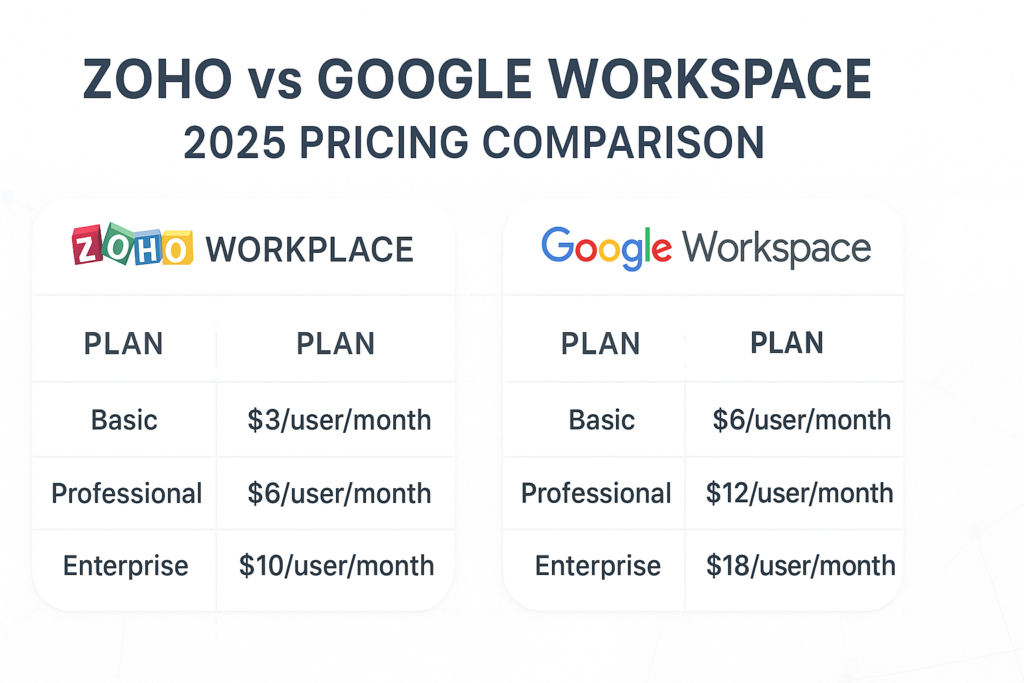
| Plan | Zoho Workplace | Google Workspace |
|---|---|---|
| Basic | $3/user/month | $6/user/month |
| Professional | $6/user/month | $12/user/month |
| Enterprise | $10/user/month | $18/user/month |
💡 Zoho offers mixed-tier users, meaning you can assign cheaper plans to lighter users. Google Workspace requires all users to be on the same plan.
Pros and Cons: Zoho Workplace vs Google Workspace
Zoho Workplace Pros
- Lower pricing – up to 70% cheaper than Google for similar features
- Privacy-first: no ads, no data tracking
- Deep integration with Zoho’s 45+ business apps (CRM, Books, Projects, etc.)
- Flexible plans – tailor per user role
- Built-in business tools (intranet, social feed, HR tools)
Zoho Workplace Cons
- Interface slightly less intuitive than Google
- Limited third-party app integrations
- Video conferencing less stable for large meetings
- Learning curve for new users
Google Workspace Pros
- World-class real-time collaboration (Docs, Sheets, Meet)
- Familiar interface — easy to onboard teams
- Massive integration ecosystem (Slack, Asana, Trello, etc.)
- Highly reliable uptime and security
- Excellent 24/7 support and documentation
Google Workspace Cons
- More expensive, especially for large teams
- All users must be on the same tier
- Limited customization in some admin settings
- Privacy concerns for data stored in Google’s ecosystem
Which Should You Choose between Zoho Workplace vs Google Workspace?
| Business Type | Recommended Platform | Why |
|---|---|---|
| Startups & SMEs | Zoho Workplace | Affordable, privacy-centric, includes CRM & automation tools |
| Remote Teams | Google Workspace | Seamless collaboration, real-time co-editing |
| Enterprises | Google Workspace (Business Plus/Enterprise) | Scalable, reliable, full admin control |
| Data-Sensitive Organizations | Zoho Workplace | GDPR-ready, no ads or data monetization |
| Developers / IT Teams | Google Workspace | Open APIs, strong ecosystem support |
Some Real-World Stats (2025)
- Google Workspace users: Over 10 million organizations worldwide
- Zoho Workplace users: Over 16 million users (and growing fast among SMBs)
- User ratings:
- Zoho Workplace — ⭐ 4.5/5 (Capterra)
- Google Workspace — ⭐ 4.7/5 (G2 & Gartner)
- Average adoption time:
- Zoho — 2–3 weeks (due to setup)
- Google — 1 week (familiar UI)
Artificial Inteligence(AI) & Future Outlook
By 2026, both suites are integrating AI-powered productivity assistants:
- Zoho Zia: An AI assistant that summarizes emails, automates tasks, and suggests replies.
- Google Duet AI: Generates docs, meeting summaries, and slides automatically.
Prediction:
AI-driven features will make collaboration more predictive – Zoho will focus on small business automation, while Google will lean into enterprise-grade AI co-creation tools.
FAQs (Frequently Searched by Users)
1. Which is better – Zoho or Google Workspace?
Both are excellent.
- Choose Google for large teams, real-time collaboration, and reliability.
- Choose Zoho for affordability, privacy, and integrated business apps.
2. Is Zoho compatible with Gmail or Outlook?
Yes. You can sync Zoho Mail with Gmail or Outlook via IMAP/POP and manage multiple accounts from one dashboard.
3. Can I migrate from Google Workspace to Zoho?
Yes. Zoho offers a migration tool that transfers emails, files, and contacts from Google Workspace with minimal downtime.
4. Which is more secure?
Both use encryption and 2FA.
However, Zoho markets itself as privacy-first, while Google provides enterprise-grade threat protection with global compliance.
5. Does Zoho offer unlimited storage?
No. Zoho’s highest plans offer scalable storage per user, but not unlimited. Google’s Business Plus and Enterprise tiers can offer virtually unlimited storage.
6. Which has better mobile apps?
Google Workspace apps are slightly smoother and widely supported. Zoho’s apps are improving rapidly and now offer offline editing, too.
Final Verdict
If you’re a small to mid-sized business looking for value and privacy – Zoho Workplace is your best bet.
If you’re a large, fast-growing, or remote-first team that relies on real-time collaboration and seamless integrations – Google Workspace will serve you better.
Both platforms are excellent, and the right choice depends on your workflow, team size, and budget.
Bonus Tip
If you’re a Google Workspace reseller or IT services provider, offering Zoho Workplace as a secondary, budget-friendly solution can attract SMB clients seeking privacy-centric alternatives.