Businesses often choose to transfer their Google Workspace subscription from one reseller to another for better pricing, improved support, or additional value-added services. Fortunately, Google allows organizations to switch resellers without losing data or disrupting user access—provided the process is done correctly.
In today’s digital ecosystem, where cloud hosting and cloud storage form the foundation of business operations, managing your Google Workspace efficiently ensures productivity and data reliability.
This article walks you through everything you need to know about transferring your Google Workspace subscription between resellers, including the steps, requirements, and best practices to ensure a smooth transition.
Why You Might Want to Switch Google Workspace Resellers
Before initiating the transfer, it’s helpful to understand why many businesses make this move:
- Better pricing and flexible billing options (monthly/annual)
- Local support and faster response times
- Additional managed services like cloud hosting, data backup, and cloud storage management
- Consolidating billing under a single IT service provider
- Access to special offers or credits available only through certain partners
Things to Know Before Transferring Google Workspace
No data loss occurs.
Your emails, files, and user accounts remain intact during and after the transfer. Only billing and administrative control shift to the new reseller.
Admin access remains unchanged.
You retain full access to your Google Admin Console throughout the process.
Pending invoices must be cleared.
Make sure all dues with your current reseller are settled before initiating the switch.
Your subscription type matters.
Some legacy or promotional plans may have restrictions, so confirm eligibility with both resellers beforehand.
Step-by-Step Process to Transfer a Google Workspace Subscription
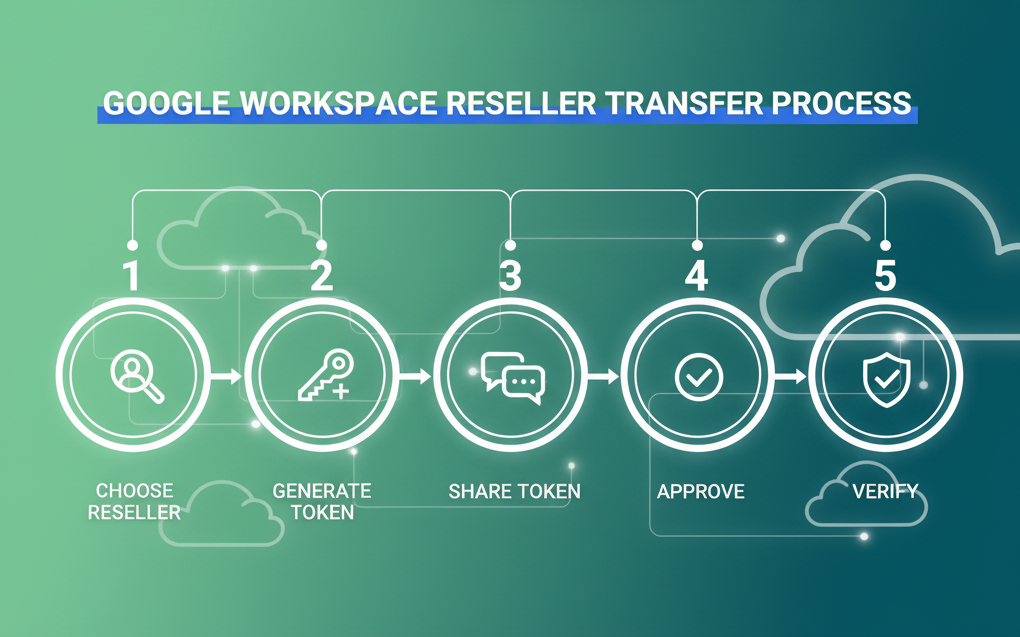
Step 1: Choose Your New Reseller
Select a new Google Workspace reseller that aligns with your business goals. Compare plans, pricing, and support options.
👉 Tip: Choose a Google workspace authorized reseller in India with certified support teams (like Net2Secure).
Step 2: Request a Transfer Token
The transfer token is a unique code that authorizes your subscription move to a new reseller.
To generate it:
- Log in to your Google Admin Console: admin.google.com
- Navigate to: Billing → Transfer subscription
- Click Generate Transfer Token
- Copy the token (it’s valid for 14 days only)
Step 3: Share the Token with Your New Reseller
Provide the token to your new reseller. They’ll use it to initiate the transfer process via Google’s Partner Console.
✅ Make sure to share your primary domain and current edition (e.g., Business Standard, Enterprise Plus).
Step 4: Verify and Approve the Transfer
The new reseller will send you a confirmation or authorization email. Once you approve, Google will transfer your billing relationship to them. The process usually completes within 24–48 hours.
Step 5: Confirm the Transfer
Coordinate timing – Avoid switching during billing cycles or major organizational changes.
Backup your data – Although data is retained, it’s best practice to have backups before major changes.
Communicate with both resellers – Ensure a clean handover and prevent double billing.
Review contract terms – Check any notice periods or refund policies with your current reseller.
Test access post-transfer – Confirm email delivery, admin access, and license counts after completion.
Google Workspace Common Issues & How to Avoid Them
| Issue | Cause | Solution |
|---|---|---|
| Transfer token expired | Token older than 14 days | Generate a new one |
| Subscription locked | Outstanding invoice | Settle payment first |
| Wrong domain shared | Admin typo | Double-check primary domain before sending |
| Delay in transfer | Manual verification pending | Follow up with the new reseller |
How Cloud Hosting and Cloud Storage Support Workspace Transfers
When managed by a reliable Google Workspace partner, cloud hosting and cloud storage services can make Google Workspace transitions smoother.
They ensure:
- Your data stays accessible during migration.
- Your backups are secure and encrypted.
- Your servers run without downtime during billing or DNS changes.
Choosing a Google Workspace reseller who also offers integrated cloud hosting solutions can help your business maintain continuity while enjoying a more efficient and cost-effective setup.
Conclusion
Transferring your Google Workspace subscription to a new reseller is a simple, risk-free process when done carefully. The key is choosing a reliable partner who offers transparent billing, proactive support, and tailored IT solutions to match your organization’s growth.
If you’re planning to migrate, Net2Secure can help you with quick reseller transfers, free setup assistance, and dedicated technical support—ensuring a seamless transition without downtime.